Multilingual user interface (MUI) setups are really common in todays world. Mostly seen with NSIS setups. If your software is multilingual you don't need to maintain tons of setups (aka - one MSI for every language). Nevertheless the below is officially not supported by Microsoft, it's possible and widly used - also by Microsoft. The most popular software I came across in the last days is Apples Safari 5.x browser. I'm sure if you search more, you will find much more setups.
See Available Language Packs or Locale Identifier Constants and Strings for the available LangID's and cultures.
How are the multilingual user interface MSIs created?
- Create your MSI in English first. The most typical seems to be English (US).
- LangID: 1033
- Culture: en-us
- Name your MSI like MyProduct.MUI.msi
- Now run your setup builder again and again for every language you own. Make sure your ProductId (GUID) is always the same. Now create one MSI per culture e.g. German:
- LangID: 1031
- Culture: de-de
- Name your MSI like MyProduct.de-de.msi
- After you have all these MSIs created you are able to run msitran.exe from Windows SDK to create transforms (.MST) with the differences between the English MSI and the translated MSI. For manual verification, you are able to apply the MST to your English MSI file in Orca and you see the changed fields.
- After these step the MST files will be saved with VBscripts from the SDK in a special storage inside the multilingual MSI file. The MSI still defaults to English, but the language depended MST is than automatically applied to the MSI file in the users language. The default language is used if no matching translation is found.
Required software:
- Windows SDK 7.0
- Windows SDK 7.1
- Windows SDK 8.1
- Windows SDK 10
- With SDK 7.0 select Win32 in section Samples
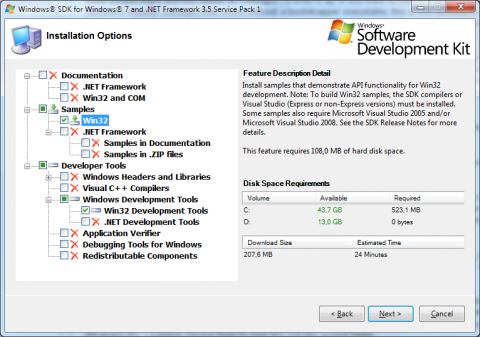
and Samples under SDK 7.1
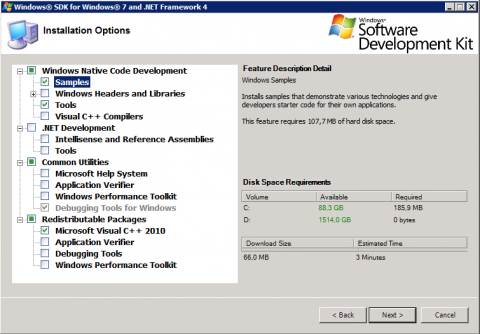
and under SDK 8.1 it's hidden under Windows Software Development Kit > (Tools)
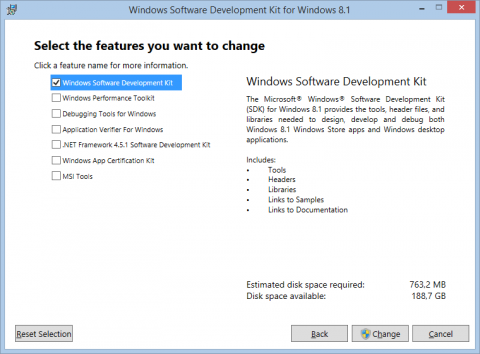
and under SDK 10
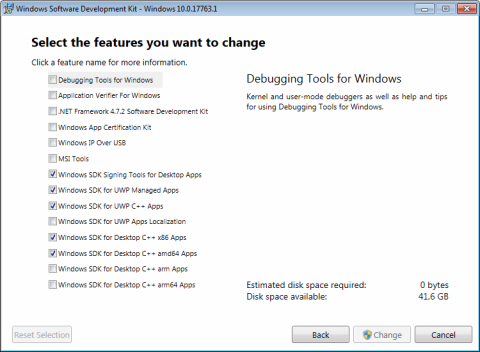
- After setup completes you will find the msitran tool and required vbscripts in
%ProgramFiles%\Microsoft SDKs\Windows\v[VERSION]\Bin and under SDK 8.1 C:\Program Files (x86)\Windows Kits\8.1\bin\x64 folders.
Batch example for automated MUI setup generation (WiX based setup):
[Build.cmd]
@ECHO OFF
REM
REM This script builds a multilingual MSI setup of MySoftware.
REM

REM Application settings
SET ProductVersion=1.0.0
SET Culture=en-us
SET MsiName=mysoftware-%ProductVersion%
SET LangIDs=1033

REM Development tool settings
SET WinSDKVersion=v7.1

REM Build the MSI with WiX Toolkit
"%WIX%bin\candle.exe" mysoftware.wxs -ext WixUIExtension
"%WIX%bin\light.exe" mysoftware.wixobj -ext WixUIExtension -spdb -out "ReleaseDir\%MsiName%.msi" -loc "Lang\mysoftware.%Culture%.wxl" -cultures:%Culture%

REM Create mulilingual user interface (MUI) setup installer
COPY /Y "ReleaseDir\%MsiName%.msi" "ReleaseDir\%MsiName%.MUI.msi"

REM Generate setup translations
CALL BuildSetupTranslationTransform.cmd de-de 1031
CALL BuildSetupTranslationTransform.cmd es-es 3082
CALL BuildSetupTranslationTransform.cmd fr-fr 1036
CALL BuildSetupTranslationTransform.cmd ja-jp 1041
CALL BuildSetupTranslationTransform.cmd zh-cn 2052
CALL BuildSetupTranslationTransform.cmd zh-tw 1028

REM Add all supported languages to MSI Package attribute
cscript "%ProgramFiles%\Microsoft SDKs\Windows\%WinSDKVersion%\Samples\sysmgmt\msi\scripts\WiLangId.vbs" ReleaseDir\%MsiName%.MUI.msi Package %LangIDs%

SET ProductVersion=
SET Culture=
SET LangID=
SET LangIDs=
SET MsiName=
[BuildSetupTranslationTransform.cmd]
@ECHO OFF
REM
REM Do not run this file at it's own. The Build.cmd in the same folder will call this file.
REM

IF EXIST "%1" = "" goto failed
IF EXIST "%2" = "" goto failed

SET Culture=%1
SET LangID=%2

SET LangIDs=%LangIDs%,%LangID%

ECHO Building setup translation for culture "%1" with LangID "%2"...
IF EXIST mysoftware.wixobj "%WIX%bin\light.exe" mysoftware.wixobj -ext WixUIExtension -ext WixUtilExtension -spdb -out "ReleaseDir\%MsiName%.%Culture%.msi" -loc "Lang\%ProductName%.%Culture%.wxl" -cultures:%Culture%
cscript "%ProgramFiles%\Microsoft SDKs\Windows\%WinSDKVersion%\Samples\sysmgmt\msi\scripts\WiLangId.vbs" ReleaseDir\%MsiName%.%Culture%.msi Product %LangID%
"%ProgramFiles%\Microsoft SDKs\Windows\%WinSDKVersion%\Bin\msitran" -g "ReleaseDir\%MsiName%.MUI.msi" "ReleaseDir\%MsiName%.%Culture%.msi" "ReleaseDir\%Culture%.mst"
cscript "%ProgramFiles%\Microsoft SDKs\Windows\%WinSDKVersion%\Samples\sysmgmt\msi\scripts\wisubstg.vbs" ReleaseDir\%MsiName%.MUI.msi ReleaseDir\%Culture%.mst %LangID%
cscript "%ProgramFiles%\Microsoft SDKs\Windows\%WinSDKVersion%\Samples\sysmgmt\msi\scripts\wisubstg.vbs" ReleaseDir\%MsiName%.MUI.msi
del /Q "ReleaseDir\%MsiName%.%Culture%.msi"
del /Q "ReleaseDir\%Culture%.mst"
goto exit

:failed
ECHO Failed to generate setup translation of culture "%1" with LangID "%2".

:exit