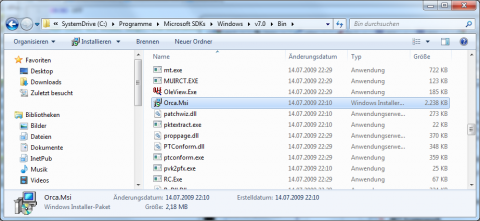
Everytime I need to install Microsoft Orca for editing and/or reviewing MSI files or to create transforms (.MST), I'm searching again where Microsoft have hidden this tool... :-) If you do not like Orca you can also use InstEdit. In opposite of some comments on the Internet; Orca is not gone and it's still downloadable!
Required:
- Windows SDK 7.1 or later
-
Select the
Win32 Developer Tools under SDK 7.0 (also on x64 systems):
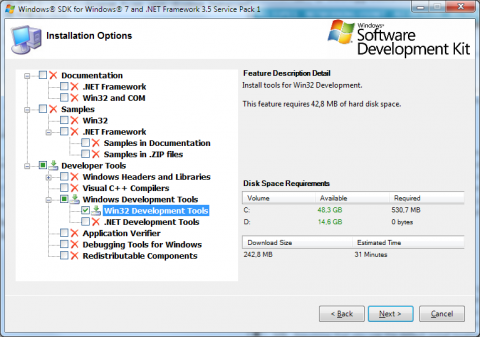
or
Tools under SDK 7.1
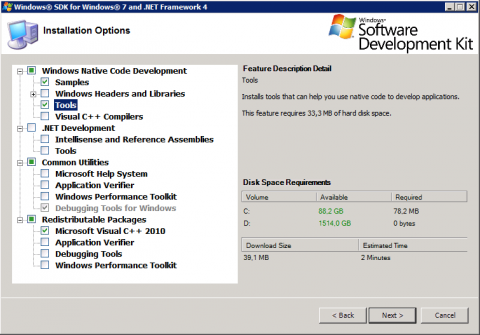
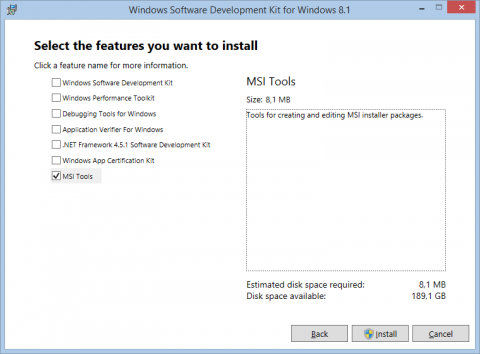
and SDK 8.1 moved it into
MSI Tools:
- After setup has installed the files, browse to the
%ProgramFiles%\Microsoft SDKs\Windows\v[VERSION]\Bin or with SDK 8.x into C:\Program Files (x86)\Windows Kits\8.1\bin\x86 folder and double click Orca*.msi. It is a bit strange - you have installed Win32 Development Tools, but the files have both been installed to the x86 and x64 ProgramFiles folders... who cares - you only need to know.