Google Adwords Editor 9.7.1 and 9.8.1 and 9.9.0 again has been released with major design flaws, see Developers best practice for Windows user profiles. It saves itself, including Adwords data in Windows folder structures that are getting lost on a user logout. Additional to this, there is no way to redirect the data folder to a Roaming Profile folder like it's possible with Google Chrome.
The fundamental broken Windows basics are:
- Roaming Profiles are not supported
- As result - all data and the application itself get's lost if you log off from the computer.
- This happens for the reason that the Application is installed to LocalAppDataFolder, what is a folder that is per definition a folder that is excluded from roaming.
- Application is not installed for All Users
- This is at least wrong design as Adwords should be used by 98% in Enterprises and not at home. The application need to be deployable per machine to be Enterprise ready.
How to workaround some of the issues?
Half of these major issues can be solved by customizing the MSI setup. Looking back to version 9.01 I can only say the MSI setup has dramatically changed in 9.7.1 in quality to the better. There are no longer strange hacks inside, for Shortcuts and all looks like a full-fledged MSI without any hacks.
First of all you need Microsoft Orca or InstEd to alter the MSI package for Installation:
- Open the file
adwords-editor-en-US.msi
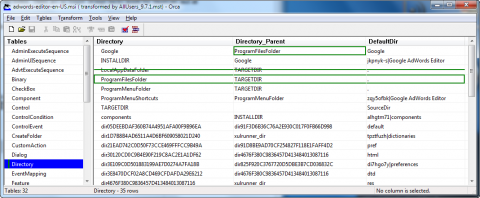
- Go to Tables > Directory
- Add a new Row
- Directory: ProgramFilesFolder
- Directory_Parent: TARGETDIR
- DefaultDir: .
- Edit the Directory named Google and set
- Directory_Parent: ProgramFilesFolder
- Drop the Directory named LocalAppDataFolder
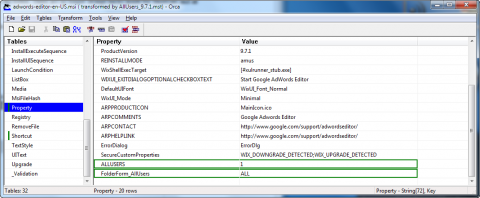
- Go to Tables > Property
- Add Row with name ALLUSERS and value 1
- Add Row FolderForm_AllUsers and value ALL
Screenshots:
Install to ProgramFiles folder:
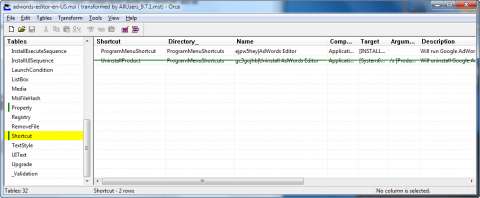
Additional to this your users will not have permission to remove per machine software from their computers and you should remove the useless uninstall shortcut row in the Shortcuts table.
NOTE: This way you are able to deploy this broken software per machine for your internal Adwords users, but you must be aware that these software still have design flaws you cannot workaround. This bugs cause data loss of all application data in LocalAppDataFolder and this will cause all setting to get wiped from disk if they log off from their computers. This is currently not a problem of data loss as all the Campains, Keywords and so on get's downloaded again from Google servers if Adwords Editor has been started, but the size of this download can be extremly large. For us it's currently ~2GB and this makes your users to wait very long to get this download finished. You can only recommend your Adwords users not to log off very often from their computers until Google fixed this bug.
Hopefully you have a very fast internet connection...
History
- 04/16/2014: Added Adwords 10.4.1 .MST file to article.
- 02/28/2014: Added Adwords 10.3.2 .MST file to article.
- 12/20/2012: Retested with Adwords 9.9.0, but still a broken setup. Added .MST file to article.
- 07/23/2012: Retested with Adwords 9.8.1, but still a broken setup. Added .MST file to article.
- 07/01/2012: Created documentation