You may have just upgraded from Simpana 8.x to Simpana 9 SP2 or later and installed the Exchange DA Client on your Windows 7 client (x64) or Windows XP. Outlook is x86 version and Simpana 9.x Outlook Addin (MSI).
The Commvault documentation Install Using AD Group Policies just tell you in the last sentence that you need permission to Galaxy.Ex2KMBDM.CVEAAddin key. That sounds like a bad joke as it does not explain that you cannot set this value with a GPO together with the installation GPO and also not with two GPOs ordered one after the other (what Support suggested). The setup removes all it's registry keys and reinstall them later (also on updates over existing versions). To apply the permissons on the registry keys and folder you need to reboot the machine after the setup has been completed. But the setup does not reboot itself as there have been no files in use that require a reboot. Now, try to explain this reboot requirements to a few hundred users...
This installer is not working properly and cannot used in Enterprise installations out of the box, just to be clear. It need to set the permissions itself or better - Commvault need to remove the write requirement to the registry keys as the policies are set per machine and nobody need permissions on the keys. Don't wonder if your users call you and complain that the Commvault Addin has been disabled or gives error popups.
Symtoms:
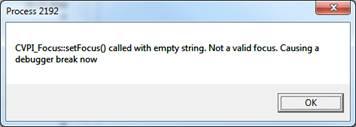
- If you try to restore archived mail elements from personal or public folder, Outlook crashes and complains with
Process [xxxx], CVPI_Focus::setFocus() called with empty string. Not a valid focus. Causing a debugger break now.
- Add-in Icons are not shown as expected and set in UIOptions registry key. e.g the Search and Find and Recover button is missing.
- Clicking Find and Recover cause
Unable to access URL: C:\Program Files (x86)\CommVault\Simpana\Base\..\GUI\addin.jnlp.temp (Permission denied).
- If you start Outlook as Administrator (not acceptable) the Find and Recover opens, but all your folders are not shown. Clicking on Search will show the folders, but will never show your items. If you do one more click the javaws process is hanging and will never come back. You need to kill javaws process via taskmanger
Workarounds:
- Issue #1 can be solved if you grant Users group full permission on Window x86 in
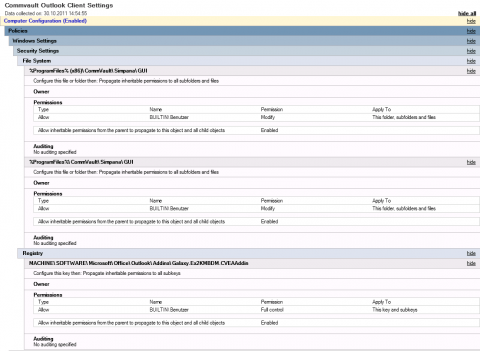
[HKEY_LOCAL_MACHINE\SOFTWARE\Microsoft\Office\Outlook\Addins\Galaxy.Ex2KMBDM.CVEAAddin] and Windows x64 in [HKEY_LOCAL_MACHINE\SOFTWARE\Wow6432Node\Microsoft\Office\Outlook\Addins\Galaxy.Ex2KMBDM.CVEAAddin] registry tree to fix the CVPI_Focus::setFocus() issue.
- Issue #2 can be solved by setting permission as required to solve #1
- Issue #3 can be solved if you grant Users group change permission on the folders
C:\Program Files\CommVault\Simpana\GUI\ and C:\Program Files (x86)\CommVault\Simpana\GUI\
- Issue #4 has no known workaround
- Registry Keys and Parameters notes a
AllowPerUserSettings that can potentionally workaround the registry permission issues too, but this has never been tested as there is no need for per user settings.
Known issues:
Post installation you need to run gpupdate /force /target:Computer once or wait for the system reboot until Group Policy refresh interval for computers is reached (default is 90 minutes). Otherwise the permissions on the registry keys are not set. This is a limitation of the order how Microsoft applies policies. Permissions are applied before the software is installed via GPO and Commvault removes the registry key in the MSI setup and than recreate it and you will end up with no permission applied to the registry key first.
Screenshot:
GPO settings required to run the Outlook Addin:
History:
- 02/07/2013: Simpana 9.0.43178 Win32 Exchange DA Client does not solve this bugs.
- 07/23/2012: Simpana 9.0.40025 Win32 Exchange DA Client does not solve this bugs.
- 06/05/2011: Simpana 9.0.35247 Win32 Exchange DA Client does not solve this bugs.
- 05/12/2011: Permission workaround found